Full enterprise workflows in your pocket.
Approvals, attendance, leave, timesheets, paychecks, expenses, assets, and notifications — with offline drafts and sync discipline, following the same persona scope and SSO policies as web.
Tracopus mobile delivers enterprise parity — Entra ID SSO, universal approvals, attendance, leave, paychecks, expenses, timesheets, and executive snapshots with the same persona scope, validation rules, and field masking as web. Field consultants log billable hours between client meetings; managers approve from the universal inbox on sync.
Full workflows in your pocket.
Approvals, projects, timesheets, attendance, leave, paychecks, and expenses — with offline drafts and the same validation rules as web.
- SSO, PIN, and biometric unlock
- Record-day timesheets in the field
- Offline drafts with sync discipline
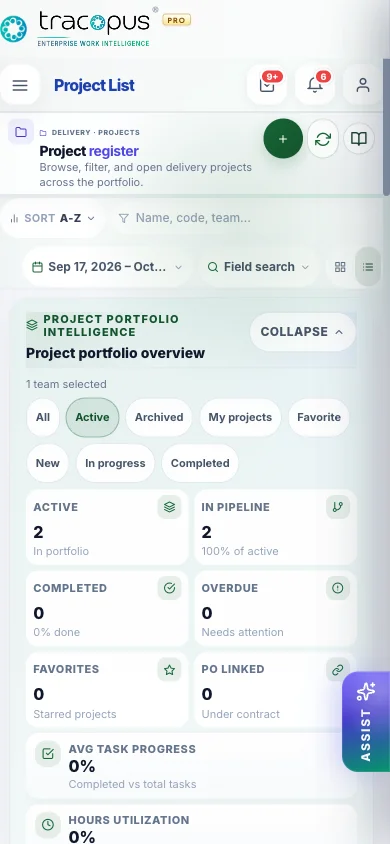
Assigned projects and quick task access from mobile.
What breaks when work lives in disconnected tools.
Point solutions optimize one department while the enterprise loses traceability — approvals stall, payroll exceptions surface late, revenue leaks between delivery and finance, and leaders reconcile exports instead of drilling from insight to source record.
- Friction 01
Delayed field time capture
Consultants wait until hotel Wi-Fi to log client-site hours — billable time arrives too late for weekly utilization review and invoice drafting. Mobile must match web timesheet locks and validation hints so teams never work around compliance.
- Friction 02
Policy mismatch between web and mobile
Mobile apps that ignore week locks, billable row rules, or approval delegation train teams to maintain shadow trackers. Finance cannot trust utilization data when mobile and web follow different validation policies.
- Friction 03
Separate mobile experience erodes trust
Different navigation, permissions, and masking on mobile vs web means managers question which system holds the truth. Enterprise mobile must be the same operating layer — not a lightweight companion with reduced governance.
What changes when teams run on one layer.
Measurable improvements across delivery, workforce, finance, and governance — not feature checklists, but operational outcomes your teams can verify in daily work.
- Record day FAB on mobile timesheet
- Task detail with checklist and status updates
- Six insight chart types with week selector
- SSO, biometrics, and palette sync
Full workflows in your pocket
SSO, approvals, attendance, leave, timesheets, paychecks, expenses, offline drafts, push alerts, and executive snapshots — same rules as web.
Secure mobile login
SSO, QR, PIN, and biometric unlock with the same persona scope and session policies as web.
Mobile approvals
Approve leave, timesheets, attendance, expenses, documents, and project gates from one inbox.
Attendance & leave
Mark attendance, request leave, and track status with web-equivalent validation rules.
Mobile timesheets
Enter and submit time against assigned work with live summaries on home.
Paychecks & expenses
View payslips, capture expenses with receipts, and track reimbursement status.
Offline drafts & sync
Secure offline drafts for time, leave, and expenses with retry, conflict resolution, and sync audit.
Push & notifications
Push-ready alerts for approvals, payroll readiness, delivery risks, and persona-scoped updates.
Executive snapshots
Portfolio health, utilization, and control tower KPIs for leaders on the move.
How work moves through Tracopus
Same-day time capture
Documented mobile timesheet path.
- 1Biometric unlock after Entra ID login
- 2Record day → pick project for billable row
- 3Entry appears on web timesheet on sync
Questions for this module
What teams usually ask before rolling this area out.
Does mobile timesheet use the same week locks as web?
Yes — validation rules and lock behaviour follow the same Application Configuration.
Is offline supported?
Task and timesheet changes can queue for sync — see mobile screen guides for per-flow notes.
One Operating Layer. Every Enterprise Workflow.
Bring workspace, people, projects, resources, finance, payroll, performance, analytics, AI agents, integrations, and admin governance into one persona-aware luxury platform.