Twelve modules. One operating layer.
Tracopus connects workspace, people, projects, resources, finance, payroll, performance, analytics, AI, integrations, and admin — every module shares luxury UI, audit events, and persona-aware scope.
Tracopus is organized as twelve modules on a single luxury shell — workspace, people, projects, resources, finance, payroll, performance, analytics, AI, integrations, admin, and mobile. Persona context, universal approvals, work graph, and connector adapters tie every module together.
One shell. Every enterprise workflow.
Workspace, people, projects, finance, payroll, AI, and admin share navigation, persona scope, approvals, and analytics — so adoption scales without re-training on every module.
- Twelve modules, one Luxury shell
- Persona-aware home and masking
- Work Graph search across entities
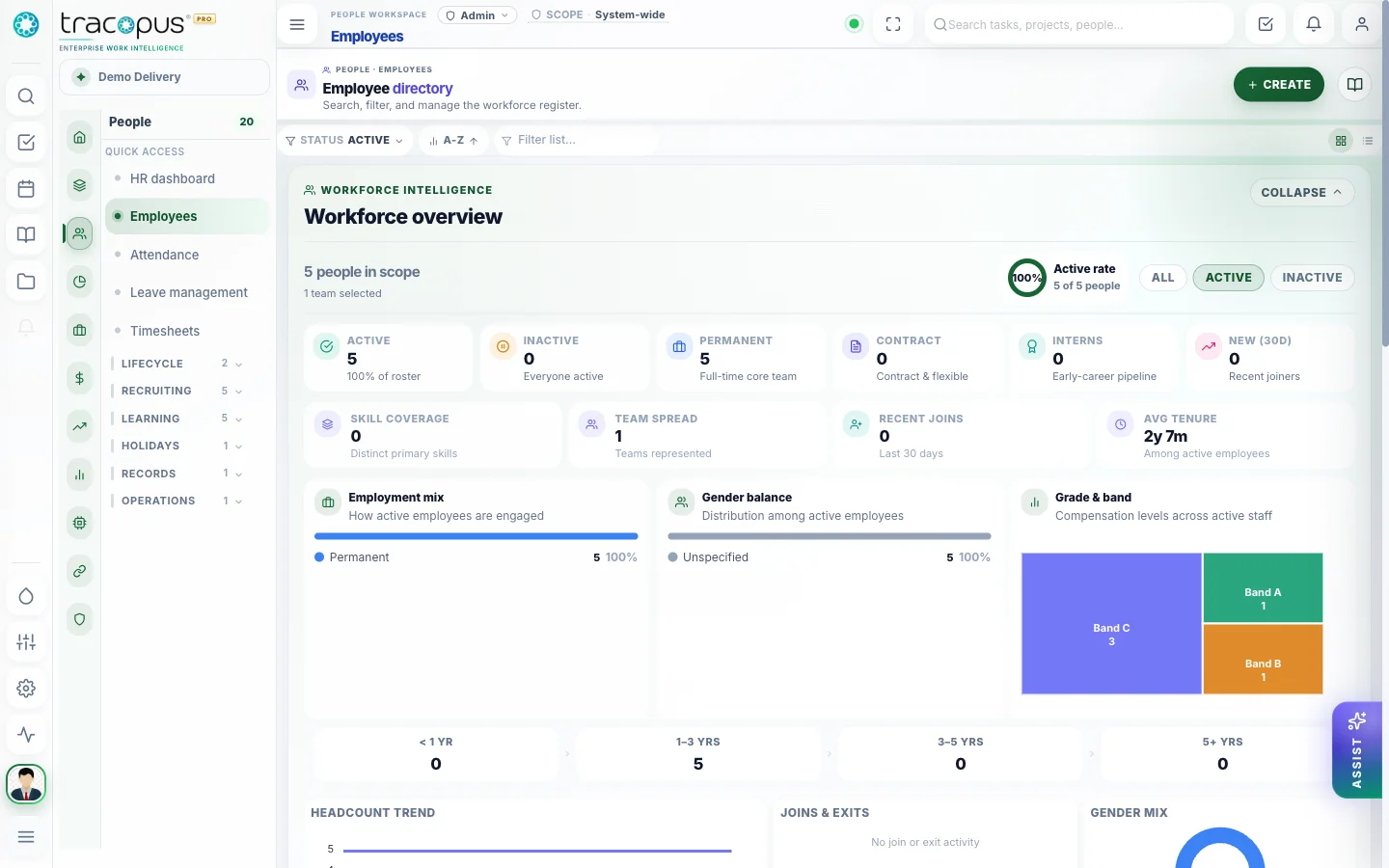
Icon rail, collapsible analytics strip, and twelve theme palettes.
What breaks when work lives in disconnected tools.
Point solutions optimize one department while the enterprise loses traceability — approvals stall, payroll exceptions surface late, revenue leaks between delivery and finance, and leaders reconcile exports instead of drilling from insight to source record.
- Friction 01
Module sprawl without shared governance
HR teams live in one system, project managers in another, payroll in a third, and finance reconciles exports at month-end. No shared approval engine, audit trail, or persona model means every handoff is manual — and executives never see one operational truth.
- Friction 02
Persona mismatch kills adoption
Employees wade through admin registers; executives see timesheet grids instead of portfolio health. Without scoped dashboards, field masking, and landing routes for nine enterprise roles, teams work around the tool instead of in it.
- Friction 03
Integration blind spots
Connectors run in the background with no health dashboard, retry queue, or trust scoring. When Salesforce, Jira, or Entra ID sync fails, stale data propagates silently until someone notices the wrong pipeline stage or missing identity.
- Friction 04
No Work Graph traceability
Leaders cannot follow a portfolio KPI back to the project, task, timesheet line, approval, or invoice that caused it. Disconnected modules force status meetings and spreadsheet reconciliation instead of drillable operational intelligence.
What changes with Tracopus
- Twelve-module icon rail with persona-aware context menus
- Universal approval engine across every domain
- Work Graph connecting people, delivery, finance, and AI
- Connector adapters with sync observability and developer marketplace
Five operating domains. One Work Graph.
Tracopus spans people operations, delivery & PSA, finance & revenue, payroll & employee finance, and platform controls — each domain shares persona scope, universal approvals, audit events, and AI recommendations that cite live source records.
- 01
People / HRMS
Hire → onboard → attend → learn → exit
- Employee 360 with persona masking
- ATS: requisitions, candidates, interviews, offers
- Onboarding & offboarding checklists
- Leave, attendance & regularization
- Timesheets with leave overlay
- Documents, policies & assets
- LMS courses & compliance training
- Benefits enrollment & payroll deductions
- Access requests tied to clearance
- 02
Projects / PSA
Plan → staff → govern → deliver
- Accounts, bids & purchase orders
- Projects, tasks & Kanban boards
- Gantt, milestones & critical path
- Risks, issues, stage gates & tickets
- Resource staffing & utilization
- NPD ideas, stage gates & launch readiness
- Dossier packages with baselines
- Lessons learned & RCA patterns
- 03
Finance & Revenue
Bill → collect → recognize → control
- Billing plans & project invoices
- Collections aging & payment status
- Credit notes & write-offs
- Revenue recognition schedules
- Vendor invoices & project cost rollup
- Project P&L and margin views
- Revenue leakage detection
- Client portal invoices & sign-off
- 04
Payroll & Employee Finance
Ready → run → pay → reimburse
- Salary structures & components
- Payroll groups, runs & locks
- Paychecks & compensation history
- Expenses with receipt upload
- Reimbursements to employee finance
- Benefits deduction mapping
- Payroll readiness intelligence
- Exception queues before lock
- 05
Platform & Controls
Configure → approve → automate → observe
- App Config, roles & module flags
- Universal approval inbox & delegation
- Workflow automation studio
- SSO, RBAC & field masking
- Integrations with sync health
- AI agents with evidence & audit
- Executive control tower & reports
- Mobile, push & offline drafts
- Industry templates & client portal
- Enterprise search on Work Graph
Twelve modules. One enterprise operating layer.
Workspace, People (ATS to payroll), Projects (delivery, NPD, dossiers), Resources, Finance (billing to rev-rec), Payroll, Performance, Analytics, AI, Integrations, and Admin — each module shares luxury UI, persona context, universal approvals, audit events, insight cards, and connector adapters.
Workspace OS
My Work queue, universal approval inbox, notifications, persona-aware home, and daily operating shortcuts.
People & Employee 360
ATS, onboarding, offboarding, attendance, leave, timesheets, LMS, benefits, documents, assets, and org policies.
Projects & Portfolio
Gantt, milestones, risks, issues, tickets, stage gates, NPD, dossiers, portfolio control tower, and delivery governance.
Resource Intelligence
Capacity, skills, staffing requests, bench, roll-offs, utilization forecasting, and scenario planning.
Finance & Revenue
Bids, POs, billing, invoices, credit notes, write-offs, revenue recognition, vendor costs, and leakage control.
Payroll & Compensation
Salary structures, payroll runs, paychecks, expenses, reimbursements, benefits deductions, and compensation history.
Performance & Growth
Goals, OKRs, review cycles, feedback, competency matrix, calibration, and growth plans.
Analytics & Control Tower
Executive control tower, custom report builder, scheduled reports, domain dashboards, and insight packs.
AI Agent Registry
Human-in-the-loop agents for HR, WBS, staffing, payroll readiness, timesheet, risk, revenue, leave, executive briefing, and knowledge.
Integrations & Marketplace
Connector catalog, sync health, retry queues, APIs, webhooks, and developer portal extensibility.
Admin & Governance
RBAC, audit, compliance exports, workflow automation studio, feature flags, retention, and masking.
Mobile Enterprise
Approvals, attendance, leave, timesheets, paychecks, expenses, offline drafts, push alerts, and executive snapshots.
Capabilities every module shares
Workspace OS, persona context, universal approvals, Work Graph, AI registry, and connector adapters — the shared luxury shell that ties twelve modules together.
Workspace OS
My Work queue, universal approval inbox, notifications, and persona-aware home for every user role.
Persona Experience
Nine personas with scoped dashboards, field masking, landing routes, and role-aware navigation.
Enterprise navigation
Global header rail, module icon rail, and context menu — twelve modules with luxury page shell on every route.
Universal approvals
One engine for leave, timesheets, attendance, expenses, documents, assets, onboarding, payroll, project gates, and invoices.
Work Graph
Connected graph across people, projects, approvals, payroll, invoices, risks, tickets, dossiers, and AI recommendations.
AI agent registry
Ten human-in-the-loop agents with evidence, confidence, accept/reject/defer, and full decision audit trail.
Connector adapters
External systems sync through adapters with health dashboards, retry queues, and trust scores.
Industry templates
Apply industry defaults for roles, modules, workflows, project lifecycles, and dashboards with preview before commit.
Client portal
External client access to scoped projects, documents, sign-off, feedback, tickets, and invoices.
Admin & automation
Audit, compliance exports, RBAC, workflow automation studio, feature flags, and data retention.
Enterprise breadth with workflow-level detail.
From ATS requisitions and onboarding checklists to revenue recognition, vendor cost rollup, client portal sign-off, and mobile offline drafts — Tracopus is built as a connected operating system, not a thin project tracker with HR bolted on.
Screens from the live workspace
Real captures from the Tracopus demo workspace — every screen a connected workflow.
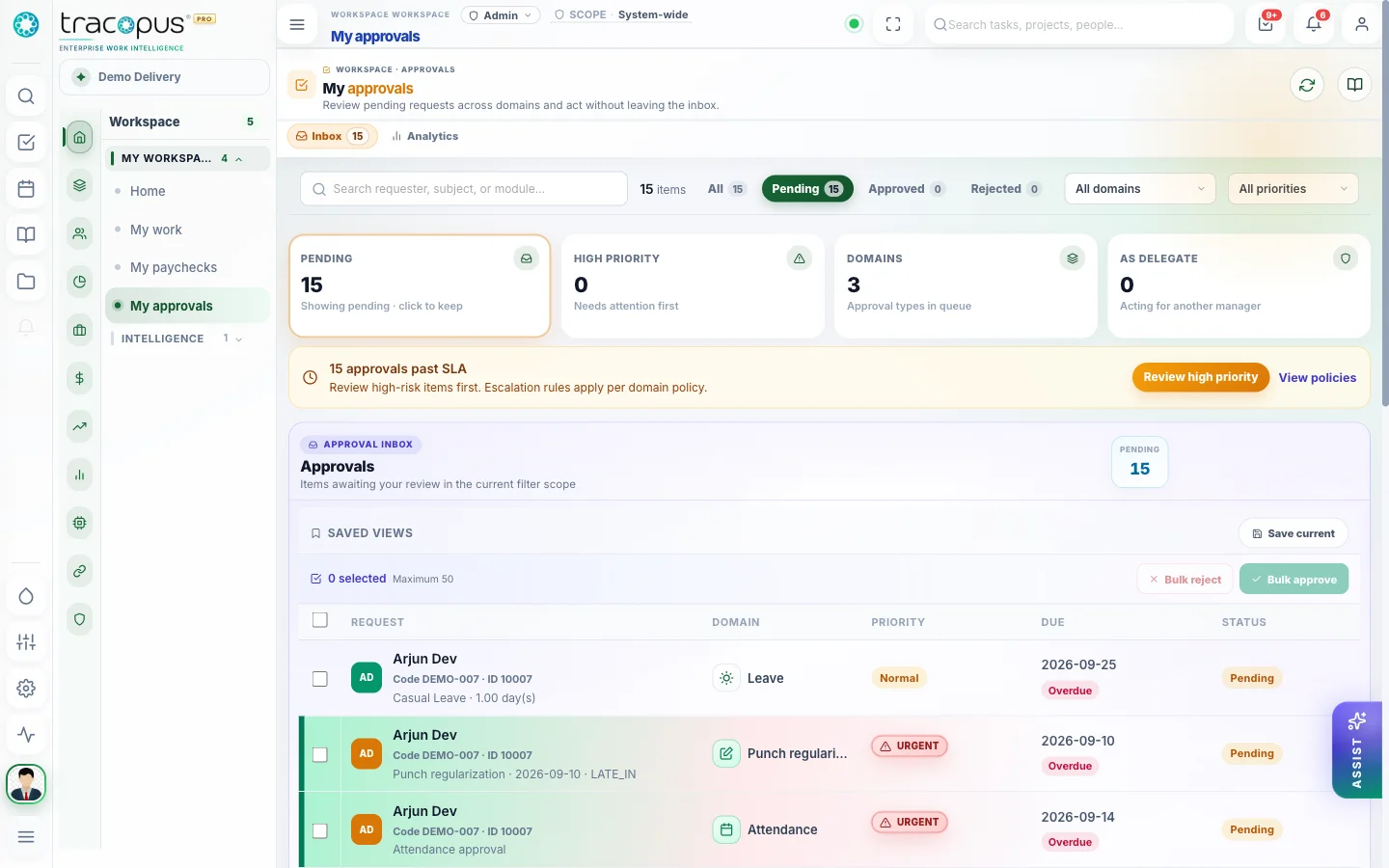
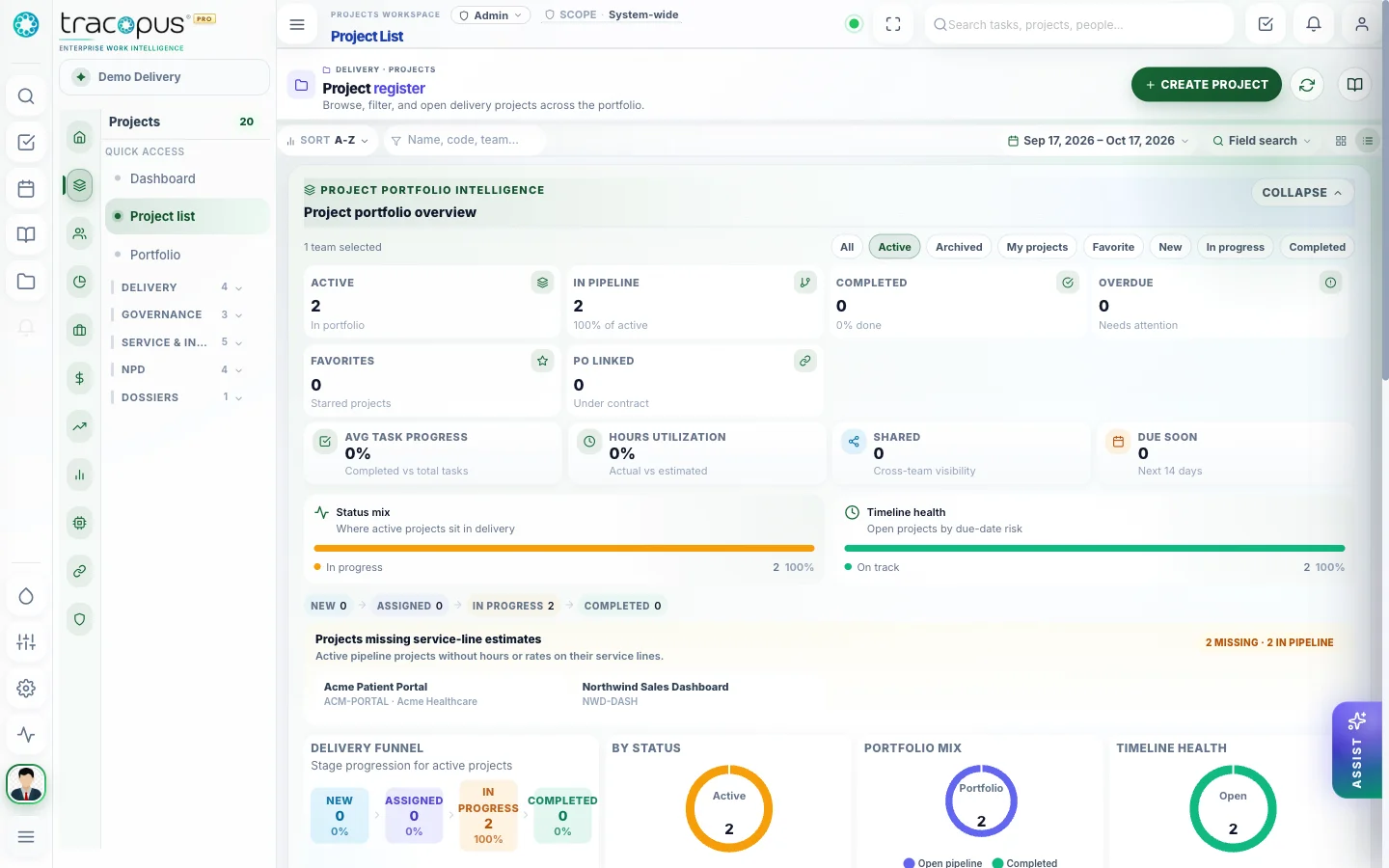
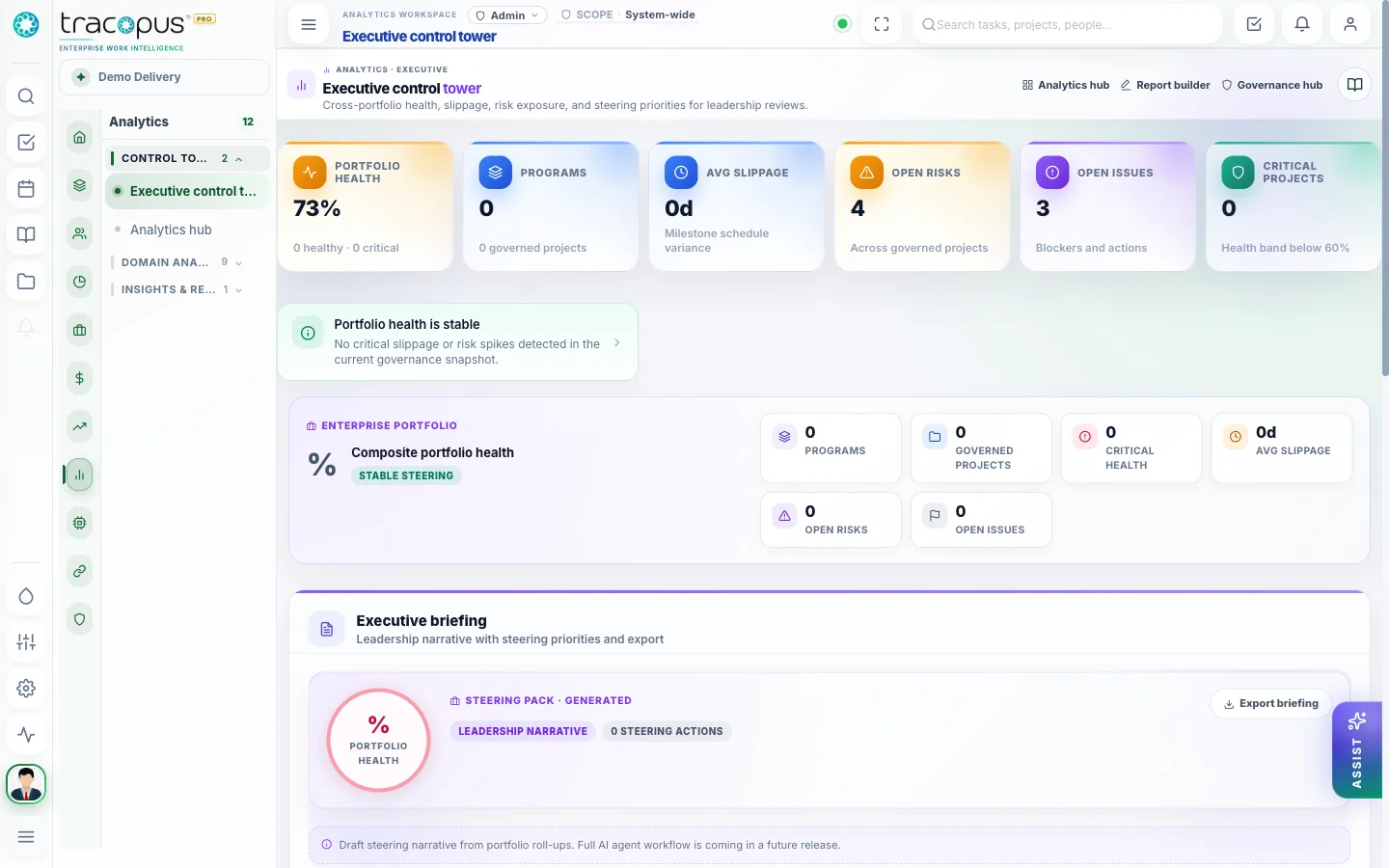
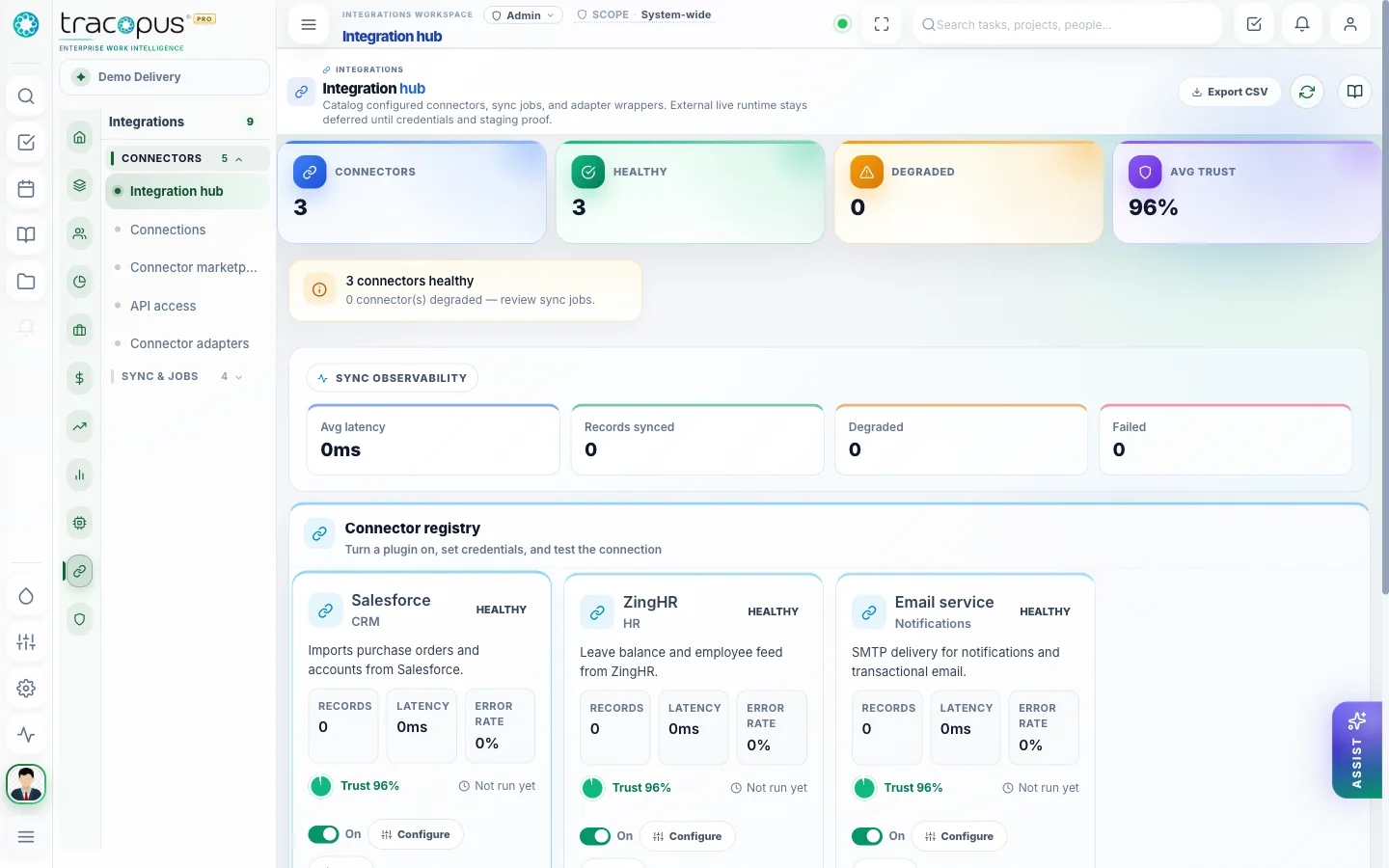
Managers clear one inbox instead of hunting across modules.
From opportunity to insight — one continuous lifecycle.
Tracopus connects sales capture, contract clarity, staffed delivery, time and attendance, approvals, billing, payroll, and executive insight in one traceable flow — so every handoff preserves context instead of losing it in email and spreadsheets.
- 1
Capture the Opportunity
Sales teams track bid requests with account context, ownership, stages, expected value, documents, funnel analytics, and follow-up activity in a structured pipeline.
- 2
Win & Contract Clarity
Won opportunities convert to purchase orders or contract records — commercial terms, dates, and account linkage preserved for delivery and finance.
- 3
Launch Delivery with Context
Delivery spawns projects from contract context with AI-assisted WBS planning, member assignment, deliverables, and staffing agent recommendations.
- 4
Staff & Allocate Resources
Resource managers review capacity, skills, bench, roll-offs, and allocation timelines — balancing utilization, margin, and delivery commitments.
- 5
Execute Through Tasks & Governance
Teams run taskboards, Gantt, risks, issues, stage gates, and tickets while collaboration, files, and notes stay in project context.
- 6
Capture Time & Attendance
Employees submit timesheets and attendance; managers validate utilization; payroll readiness agents surface blockers before processing.
- 7
Approve, Bill & Pay
Universal approvals route leave, expenses, and timesheets; finance generates invoices from approved billable time; payroll runs publish paychecks with audit trail.
- 8
Review, Learn & Improve
Executive control tower, domain dashboards, AI briefings, lessons learned, and RCA patterns feed continuous improvement across the Work Graph.
Context, communication, and work — never separated.
My Work, universal approvals, chat, files, notes, calendar, notifications, and Work Graph search live in the same luxury shell as delivery and people operations — so teams never hunt across systems to understand what happened, who owns the next step, or where the latest document lives.
My Work Queue
Persona-aware assigned work, approvals, and action items in one daily operating hub.
Universal Approval Inbox
Leave, timesheets, expenses, documents, assets, project gates, budgets, and invoices in one approval engine.
Contextual Chat
Team conversations in the same workspace where projects, tasks, payroll, and delivery context live.
File Manager
Structured folders, previews, versioning, and access-aware sharing across projects and employee documents.
Notes & Calendar
Personal and shared notes, milestones, tasks, and schedule views connected to project and people records.
Work Graph Search
Enterprise search across people, projects, approvals, documents, payroll, risks, tickets, and AI recommendations.
Notifications
Real-time alerts for approvals, payroll readiness, delivery risks, integration sync, and persona-scoped updates.
Governance that scales with the enterprise.
Persona context, field masking, universal approvals, unified audit trails, compliance exports, workflow automation, and integration health — Tracopus gives IT and operations leaders control without sacrificing the employee experience.
Persona Context
Every screen resolves scope, masking, and landing routes from a shared persona model — employee through executive.
Universal Approvals
One approval and delegation engine across payroll, expenses, documents, assets, projects, budgets, and invoices.
Audit-First Mutations
Every change emits audit events with actor, persona, scope, entity, and before/after values.
Field Masking
Salary, payroll, PII, and financial fields mask by role, persona, and export policy — not just by screen.
Connector Governance
External systems sync through adapters with health dashboards, retry queues, and trust scores.
Workflow Automation
Admins configure triggers, conditions, actions, and notifications without code in the automation studio.
One Operating Layer. Every Enterprise Workflow.
Bring workspace, people, projects, resources, finance, payroll, performance, analytics, AI agents, integrations, and admin governance into one persona-aware luxury platform.